

Importing AGi32 Files-Concepts
AGi32 will allow you to merge multiple job files together while preserving the active content of each file (luminaires, calculation points, rooms, etc.). This can be valuable when you find it necessary to combine information from several job files for a single presentation or summary. When an AGi32 file is imported, the imported file is treated as a separate project. You can import any combination of drawing entities, text, luminaire types and locations, LPD/UWLR areas, statistical areas, calculation entities, rooms and objects. When merging an AGi32 that already contains multiple projects, AGi32 will combine them into one single project. You may also choose to import only the luminaires, by selecting Luminaire Types Only.
AGi32 applies the default project name specified in System Settings (AGI_Import_1 by default). If the specified Project name already exists in the current job file, you will be prompted to choose a different name. Project names must be unique.
Textures defined in the imported AGi32 files will be imported into the new job file as long as they are found in the local Textures Database.
When importing an AGI file with defined Scenes and Channels, the Scenes and Channels will not be imported.
When importing entities, a suffix is appended to the entity label to distinguish it from similar labels already defined in the job file. The suffix used is a numeric suffix - _1, _2, etc.
Examples
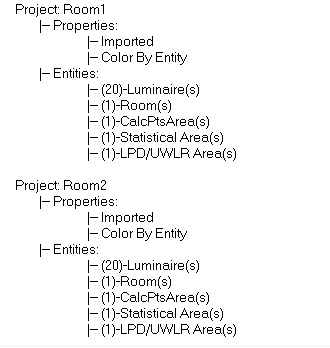
Consider the following example. We wish to import the same AGi32 file twice into one master job file. The projects will be used to compare two switching options side by side.
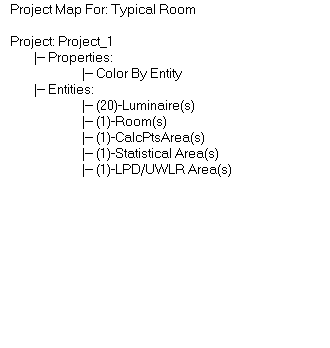
The Project Map in Project Manager for the original file resulting file is shown below:
|
Original Job File:
|
Merged File: Project names chosen: Room1 and Room2
|
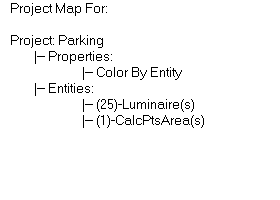
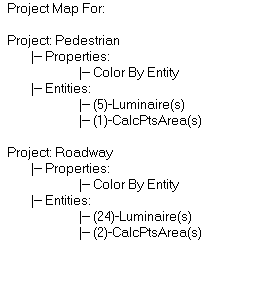
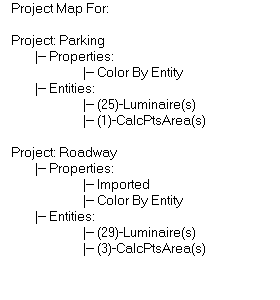
Consider another example. File2 is to be merged into File1. File 2 contains two existing projects. The Resulting File is shown.
|
File1: Single Project: Parking
|
File2: Two Projects: Roadway and Pedestrian
|
|
Merge File2 into File1 Two projects: Parking and Roadway (Pedestrian project is absorbed in Roadway)
|
|
When to Merge AGi32 Job Files
The following list contains some common scenarios where you may wish to consider merging individual job files. While not exclusive, it should give you an excellent starting point for expanding your presentation capabilities.
- Merge a Title block with Smart Text into your current job file.
- Merge individual rooms or floors into one building presentation. Apply an offset so that the rooms do not overlap each other.
- Merge multiple design concepts side by side into one presentation file. Use Freeze or Off in Project Manager to remove project from calculation consideration.
- Merge adjacent areas, such as parking areas or ball fields, into one summary file.