
AGi32 is a state of the art illumination engineering program. It will run on legacy hardware for simple applications. Users planning on taking advantage of the full spectrum of power offered by AGi32 should consider the Recommended Minimum hardware requirements.
Current AGi32 System Requirements Online
The computer's regional settings must use periods instead of commas for decimal numbers. Example: 10.6, rather than 10,6. In addition, they must be set to display a leading 0. Example: 0.7 rather than .7.
The regional settings are accessed in Windows from the Control Panel, then Region and Language. Click on the Additional Settings button. This is an example:
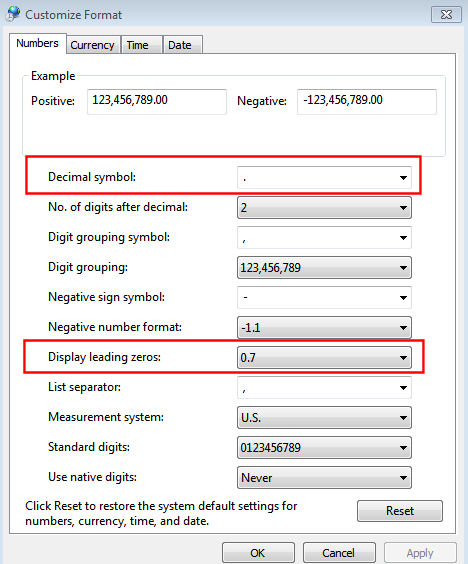
The regional settings must be correct prior to attempting to open AGi32. Otherwise, a warning message open explaining the problem, and then AGi32 will close.
* AGi32's radiosity calculations, ray-trace rendering, and most calculation point operations will utilize multi-core\processor configurations. The more cores or processors (up to 32 maximum), the faster the program execution.
** If the screen does not meet the minimum resolution, the text on some tabs may be removed and only the icon displayed.